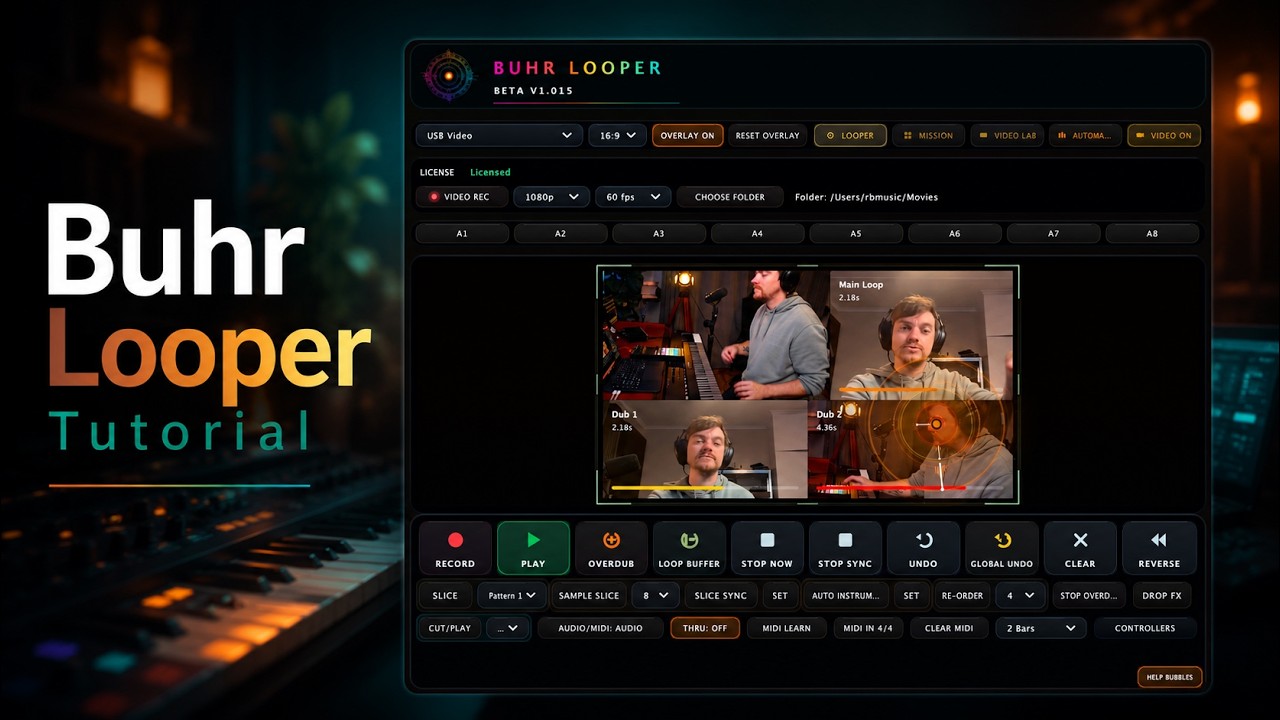
Every looper ever made answers one question: can I play against myself? Buhr Looper answers a second one nobody else does — can the audience watch the loop being built?
Because Buhr Looper isn't just an audio looper. It's an audio + video live-looping plugin for macOS. When you record a loop, it captures the sound and a synced clip from your camera, locked to the exact same loop clock. What people hear and what people see are the same loop. That's the whole idea, and once you've performed with it, going back to a black box on the floor feels a little lonely.
Let's take the tour.
One loop clock, two worlds
At its core, Buhr Looper is a rock-solid audio looper. Press Record to capture, press again to flip to Play, then stack up to eight overdub layers on top. Everything launches and stops on the bar, with fades and crossfades so nothing ever clicks. Each loop can run up to two full minutes — the buffer is reserved up front, which is part of why the live visuals never stutter.
Here's the trick that makes the rest possible: every overdub is its own independent layer summed over the base loop, and as of recent builds those layers phase-lock to the base loop's own wrap point rather than the host's bar grid. Translation: your stacks stay dead in time even in DAWs that don't latency-compensate the plugin's input. No drift, no "why is layer four flamming."
And because there's a single, sample-accurate loop clock, the video can hang off it perfectly. That's the foundation everything else is built on.
The audio toolkit, in brief
Buhr Looper is loaded with performance moves that go way past record-and-play:
- Tempo-synced time-stretch — loops follow your DAW's tempo without changing pitch.
- Reverse — flip any loop backwards on the fly, with a clean fade.
- Slice, Reorder & Cut/Play — chop the loop into divisions, mute and rearrange them, or beat-repeat-retrigger on a chosen subdivision for stutter drops.
- Loop Buffer (pre-record) — a rolling 1- or 2-bar buffer that captures what you just played, after the fact.
- Stop Now / Stop Sync / Stop All Overdubs — instant cut, musical synced stop, or wipe every layer at once.
- MIDI looping — switch a slot to MIDI and loop note data to drive your soft-synths, complete with a circular piano-roll display.
- Record launch quantize — right-click Record to punch in Instant, 1 Bar, ½ Bar, ¼ (beat) or ⅛ so you can start a loop mid-bar instead of always waiting for the downbeat.
Then it grows eyes
This is where Buhr Looper stops being "a looper" and becomes a visual instrument. The Video Lab turns your webcam into part of the performance:
- Each loop records a synced video clip that replays in time with its audio.
- An Auto-Cut engine arranges those clips into polished multi-cam layouts as you stack — 20 compositions to choose from.
- New tiles arrive with 40+ cinematic entry animations (particle blooms, glitch tears, galaxy swirls, plus a calm "ambient" family).
- A bank of 24 real-time video effects — VHS, kaleidoscope, RGB split, strobe, zoom blur and more — runs live on the feed, the overdub tiles, or everything.
- Auto Captions fire animated text on loop events with 25 font styles. Hand & motion tracking auto-frames the action. And you can flip the whole stage to 16:9 or 9:16 for widescreen or vertical platforms.
You can even give each overdub its own cinematic color grade — Noir, Cinematic, Warm, Cool, Vintage, Vivid, Dream, Infrared, Mono — so a stack of loops reads like a stack of scenes.
Built for real sets
Two more systems make Buhr Looper gig-ready:
Mission Control is a cross-instance hub. Load several Buhr Loopers in one session and Mission Control sees them all — live previews, a shared stage that composites every instance into one scene, a Global Undo that removes the most recent loop across the whole rig, and a built-in recorder that captures the whole stage to a synced .mov (up to 4K/60) with the performing instance's own audio baked in. Stream it, or post it.
MIDI control runs deep: full MIDI Learn, mappings that persist machine-wide across reinstalls, host-automatable parameters so you can sequence the looper from Ableton clips, and first-class hardware support — Nektar Pacer, Akai APC40 MK2, Akai APC Mini, Novation Launch Control XL MK2, NI Traktor Kontrol F1 — complete with colored LED feedback (blinking red to record, orange to overdub, solid green to play).
Who it's for
- Live loopers who want their visuals to be as good as their stacks.
- Producers who loop in Ableton or Logic and want clips, not just sound.
- Content creators making Shorts, Reels and TikToks — record the music and the vertical video in one take.
- VJs and AV performers who want one instrument that plays sound and picture together.
Buhr Looper ships as AU and VST3 for macOS (Intel + Apple Silicon), Apple-notarized, with an instant one-key Gumroad unlock.
The short version: it's the looper that finally lets the room watch the loop.
Get Buhr Looper
Buhr Looper runs as an AU and VST3 plugin on macOS (Intel + Apple Silicon) and Windows, signed and notarized by Apple. Record your first audio-and-video loop in about ten seconds, unlocked instantly with a Gumroad key.
</content>
FAQ
What is Buhr Looper?
Does Buhr Looper really loop video?
What do I need to run it?
Written by Reinhardt Buhr, a live-looping multi-instrumentalist and the developer behind Buhr Looper — the world's first all-in-one video, audio & MIDI live looper. Grab the 70% launch discount.

